
Primary internet versus backup internet
Your primary internet is the main connection into a location, typically fiber, cable, or a dedicated line. It carries everything during normal operation. Backup internet is a completely separate connection that sits in reserve and takes over the instant the primary fails. The two are not interchangeable. The primary is built for everyday bandwidth, and the backup is built for one job: keeping the critical systems alive during an outage.
The reason restaurants need both is that no single connection is immune. Even the best fiber line goes down for reasons outside your control, from a contractor cutting a cable to a provider outage across the whole region. Redundancy is the only real answer, which is why backup internet sits at the center of any serious restaurant connectivity setup.
Why the backup should be wireless and diverse
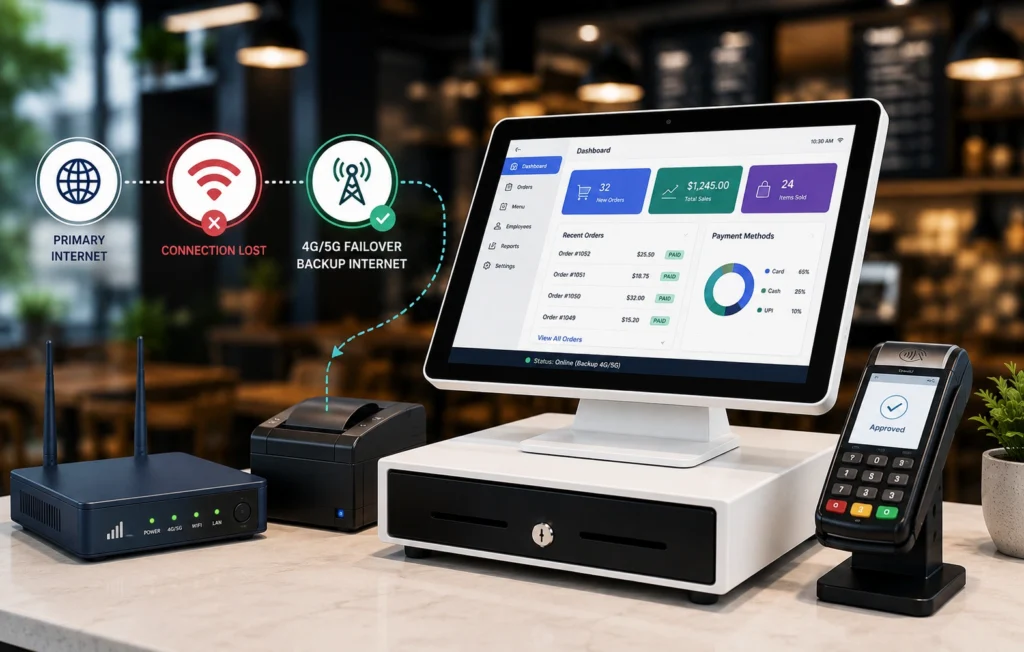
The single most important rule of backup internet is that it must fail independently of your primary. If both connections share the same physical path or the same provider, a single event can take out both, and your backup was never really a backup. A 4G or 5G wireless connection on a different carrier solves this. It reaches your location through the air over a separate network, so the cut fiber or regional outage that kills your primary leaves your wireless backup untouched.
Modern 4G LTE and 5G are more than fast enough to carry a restaurant’s critical traffic during an outage. The goal of the backup is not to replace your full primary bandwidth, it is to keep payments, POS, online ordering, and phones running until the primary returns.
How automatic failover works
Backup internet only protects you if the switch is automatic. The setup uses a router or SD-WAN device that monitors the primary connection continuously. When it detects a failure, it reroutes traffic to the wireless backup within seconds, then shifts back when the primary recovers. No staff action, no hotspots, no reconnecting terminals by hand. This is the same mechanism that powers POS failover, because keeping the POS online is the headline job of any backup connection.
Vivant delivers this as SmartCONNECT. When the primary internet goes down, it switches service to a backup connection within seconds, so the restaurant does not lose revenue to an outage. The point is that it runs in the background. The best feedback an operator can give is that they never think about it.
What happens the moment your primary fails
It helps to picture the sequence. At 7:12 on a Friday the fiber line into your busiest location goes dark. With no backup, terminals freeze mid-transaction, the order tablets drop off, and the phones go silent, all at once. With automatic failover, the monitoring device detects the loss within a second or two and reroutes live traffic to the 4G or 5G backup. Cards that were mid-authorization complete, the next ticket prints in the kitchen, and the dining room never knows anything happened. When the fiber recovers, traffic shifts home automatically. The whole event becomes a line in a monitoring log instead of a story your managers retell for weeks.
How much bandwidth your backup needs
During an outage, you do not need to run everything, you need to run what makes money and what protects customers. That means prioritizing POS and payment traffic, online ordering and third-party delivery, and phones, while lower-priority traffic like back-office uploads or guest WiFi can wait. A managed setup uses traffic prioritization so the important systems get the backup bandwidth first. We cover how to size your primary and backup together in the best internet for restaurants checklist.
Backup internet versus a simple second wired line
Some operators try to solve redundancy by ordering a second wired connection. It is better than nothing, but it has a weakness. Two wired lines into the same building often share conduits, infrastructure, or the same regional provider, so a single event can still take both down at once. Wireless backup on a separate carrier removes that shared risk by using an entirely different path to reach your location. The strongest designs combine both ideas through SD-WAN, blending wired and wireless connections so traffic always has a healthy route to take.
Test your failover before you need it
💡 A backup connection you have never tested is a guess, not a safeguard.
The right way to deploy failover includes verifying that the cutover actually happens, that payments and orders keep working on the backup, and that the system fails back cleanly when the primary returns. A managed provider tests and monitors this for you, so the first time your failover runs is not the first time you find out whether it works. If your current setup has a backup line that nobody has ever watched take over during a real outage, that is worth checking before the next storm does the testing for you.
Dedicated backup versus a shared hotspot
A phone hotspot or a consumer mobile plan is not backup internet. It is not monitored, it does not fail over automatically, it has no traffic prioritization, and it is not built to handle payment data securely. Real backup internet is a managed connection with automatic failover, security, and support behind it, which also matters for keeping payment processing PCI compliant during an outage.
One bill across internet, backup, and phones
Backup internet rarely makes sense on its own. It works best as part of a managed package that includes primary internet, VoIP phones, and security, billed together and supported by one team. That matters most during an outage, because the last thing an operator wants at 7 p.m. on a Saturday is to call three vendors who each blame the other two. With a single provider, one team owns your uptime from the primary line to the backup to the phones.
What to look for in restaurant backup internet
- Wireless and diverse: a 4G or 5G backup on a carrier separate from your primary.
- Automatic failover and failback: measured in seconds.
- Traffic prioritization: so POS, payments, and ordering get bandwidth first.
- Active monitoring and live support: not a self-managed device.
- Standardized across locations: the same protection at every site for multi-unit groups.
Frequently Asked Questions
What is backup internet for a restaurant?
It is a second, independent internet connection, usually 4G or 5G wireless on a different carrier, that automatically takes over when the primary connection fails so the POS, payments, online ordering, and phones stay online.
How fast does internet failover switch over?
With a properly configured system, failover happens within seconds, fast enough that payment and order sessions stay live and staff and customers do not notice the outage.
Is 4G or 5G fast enough to run a restaurant during an outage?
Yes. The backup only needs to carry critical traffic such as POS, payments, online ordering, and phones during the outage, and modern 4G LTE and 5G handle that comfortably, especially with traffic prioritization.
Does backup internet cost a lot?
It is modest compared with the revenue a single peak-hour outage can cost. Backup is priced as ongoing insurance for uptime, and for multi-unit groups it is typically bundled with primary internet and phones under one bill.
Can I just use a phone hotspot as backup?
A hotspot is not a substitute. It does not fail over automatically, is not monitored, lacks traffic prioritization, and is not built to handle payment data securely. Managed backup internet is purpose-built for these requirements.
Backup internet is the cheapest insurance against your most expensive problem.
See how it would work across your locations.