A managed service provider, or MSP, is your single technology partner. Instead of juggling vendors and reacting to disasters after they hit, you have one team looking after your internet, phones, network, and the systems that run on them, so you can get back to running the business.
This usually happens to small businesses that buy their internet from one company, their phones from another, and call a third person when the network breaks. With no one watching the whole setup, there is no way to spot trouble before it lands on a customer.
What Exactly Is a Managed Service Provider?
An MSP is a company that takes ongoing responsibility for parts of your business technology. They keep an eye on your internet, phone & network, carry out maintenance before things break, and step in with support when you need it.
This is different from the old “break-fix” way of doing things, where you only call someone once something has already gone wrong. Break-fix sounds cheaper because you only pay when you need help, but it costs more over time. By the time you notice a problem, it has usually already cost you a sale, a shift, or a customer, and emergency call-out rates are far higher than steady monthly support. In fact, according to this industry report, three hours of downtime can cost small businesses between $22,500 and $77,000.
$22,500
minimum cost of 3 hours of downtime for a small business
$77,000
maximum cost of 3 hours of downtime for a small business
93%
of organizations using managed services reported better overall efficiency (CompTIA)
Take a point-of-sale system, which is just the till and card reader that processes customer payments. Under a break-fix setup, everything looks fine until it crashes mid-service on your busiest weekend. Your staff cannot take payment, and you keep losing sales until a technician can get to you.
An MSP is built to monitor the network, devices, and software around the clock to catch issues before they lead to outages. And because they already know your setup, they can fix most things without you having to explain it from scratch.
The Five Core Services an MSP Provides
Managed service providers structure their offerings around these five areas:
1. Internet Setup and Procurement
Shopping for business internet gets confusing because different carriers serve different locations, and pricing varies as well. An MSP helps you skip this tedious process by:
- Finding out which carriers actually reach your location
- Negotiating a rate that fits your budget
- Booking and coordinating the installation
- Managing the whole rollout so you lose as little trading time as possible
If you own a restaurant chain or a multi-location business, this managed service can help you save time (and resources) coordinating vendors in different cities.
Before moving forward, have you wondered ‘is 300 Mbps fast enough for my business?’
2. Backup Internet with Automatic Failover
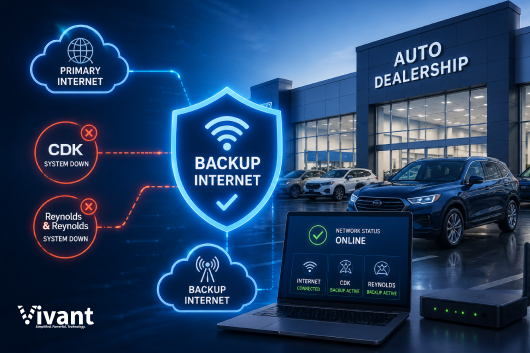
A single internet connection is a single point of failure. When it goes down, your entire operation stops. An MSP solves this by installing a backup connection that switches over automatically when your primary fails, without requiring anyone to manually intervene or even notice.
3. Cloud-Based Phone Service
Most small businesses have dropped traditional phone lines in favor of cloud-based phones, often called VoIP, which simply means your calls run over your internet connection instead of old copper wiring. It costs less and is far more flexible. With this, you can:
- Move calls between locations instantly
- Forward calls to a cell phone
- Add a new extension without calling out an electrician
- Manage everything from a single screen
When the same partner manages both your internet and phones, the systems work together, reducing the likelihood of an outage.
4. Security and Compliance
An MSP also handles the security side through a managed firewall, which is software that screens what is allowed in and out of your network. They set it up to meet the rules your industry has to follow, such as PCI for card payments, HIPAA for health information, and GDPR for customer privacy. Getting this right protects you from data breaches, failed audits, and the reputational hit that follows a public security scare.
5. Real Human Support from People Who Know Your Setup
Because an MSP monitors your network every day, the person who picks up already understands how your systems are put together. This means they can diagnose and fix most issues without you having to walk them through everything first, which is exactly what you want at 7 pm on a Saturday.
MSP vs. Traditional IT Support: The Practical Difference
These are the main differences between MSP and traditional IT support:
| Aspect | Traditional Break-Fix IT | Managed Service Provider |
|---|---|---|
| Monitoring | Only when you call | Continuous, 24/7 |
| Cost structure | Hourly or per-incident | Flat monthly fee |
| Financial incentive | Profit increases when problems occur | Profit aligned with uptime |
| Response time | Depends on their availability | Prioritized by a team that knows your setup |
| Planning approach | Reactive only | Proactive maintenance and planning |
| Vendor management | You manage multiple companies | One partner, one bill |
| Failover capability | Manual or nonexistent | Automatic and immediate |
| Support availability | Often, business hours only | Available when you need help |
Why Small Businesses Need an MSP
Most owners only think about their technology when it stops working. Even a short outage can lead to lost revenue and frustrated customers. An MSP monitors your systems around the clock and quietly handles maintenance, security updates, and minor fixes in the background, so your business stays open.
You get predictable costs instead of surprise bills. With traditional IT support, you never know what a crisis will cost until it happens. An emergency call during peak hours? Triple the hourly rate. System down over the weekend? Emergency fees apply. An MSP replaces all of this with a flat monthly fee you can budget for, like rent or insurance. You know exactly what you are paying, and you are not blindsided by surprise invoices when something goes wrong.
You get specialist expertise without hiring it. Covering networking, security, and compliance properly would mean hiring more than one full-time specialist, which is out of reach for most small businesses. An MSP gives you a whole team of those specialists for a fraction of a single salary, and you only pay for what you use.
You build trust through reliability. Customers notice when you always answer the phone and their payment always goes through. In crowded fields like hospitality, retail, and professional services, simply being dependable is a competitive advantage, because people remember which businesses they can count on.
You can grow without your technology holding you back. When you open a second site, the MSP sets up internet, phone, and network services there as well and securely links it to your first location. You do not have to learn how to manage a new provider in a new city, so adding a location remains a business decision rather than a technical headache.
Your data stays protected without you watching it. Through the managed firewall, ongoing monitoring, and threat detection, an MSP keeps your security current and keeps you on the right side of the rules, so you are not lying awake worrying about fines or breaches.
There is also the matter of simply being able to see what is going on. Most small businesses have no view into how their network is performing until something breaks. An MSP gives you live information on uptime and performance, so you can see when calls are dropping, payments are running slow, or the connection is starting to struggle, while it is still a warning sign rather than a disaster.
💡 The technology association CompTIA found that 93 percent of organizations using managed services reported better overall efficiency, largely because the busywork and the firefighting get taken off the team’s plate.
Five Questions to Ask Before Choosing an MSP
Not every provider is the same, and the wrong one can leave you stranded. Here are some questions to ask before you make your final choice:
Q. What exactly does my monthly fee cover?
The whole point of the model is predictability, so you need a clear list of what is included and what would trigger an extra charge. If a provider cannot give you a straight answer, it’s a red flag.
Q. How quickly does the backup actually kick in?
“We offer backup internet” can mean anything. Ask how many seconds pass between the main line failing and the backup taking over and ask them to put it in the contract.
Q. Do I get a named contact or a call center?
A dedicated person who already knows your setup beats having to explain your whole business from scratch every time, especially in an emergency.
Q. Will it work with the tools I already use?
Ask whether they connect to your point of sale, customer records, and other key software, because when those systems talk to each other, you get a single, clear view of your customers instead of scattered fragments.
Q. Can you give me references from businesses like mine?
Ask for customers in your industry who have used them for at least a year. Then, call the businesses and ask whether the provider actually delivered on uptime and responded fast when it mattered.
Where Vivant Fits In
A provider that ticks all of these boxes will save you a lot of headaches. Vivant’s managed network services include a 100 percent uptime guarantee with proactive monitoring, one partner/one bill across every location, and fully managed backup internet and firewall tools, all run on the same protected infrastructure.
To know what downtime is quietly costing your business right now, request a free connectivity cost analysis to see the numbers for yourself.
Frequently Asked Questions
What does an MSP do?
An MSP monitors your systems, keeps them maintained and secure, sets up your internet and phones, and provides support, all on a continuous basis rather than only when something breaks.
What is the difference between an MSP and regular IT support?
Regular IT support waits for a problem and bills you to fix it. An MSP monitors your systems all the time and works to prevent problems.
How much does an MSP cost for a small business?
The price depends on the vendor, the level of support you need, the complexity of your IT environment, and whether pricing is based on users, devices, or a flat monthly fee.
Is an MSP worth it for a small business?
Yes, an MSP is worth it for small businesses, especially sectors that rely on payments, phones, and a steady connection to trade. The cost of one outage during a busy period often outweighs months of managed support.
How do I know when my business is ready for an MSP?
A good sign that your business is ready for an MSP is when technology problems cost you sales or staff time, you manage several separate vendors, or you’re about to open another location and do not want to repeat the setup headache from scratch.
Find out what downtime is costing your business right now.
Request a free connectivity cost analysis — one partner, one bill, 100% uptime guarantee.