Quick answer
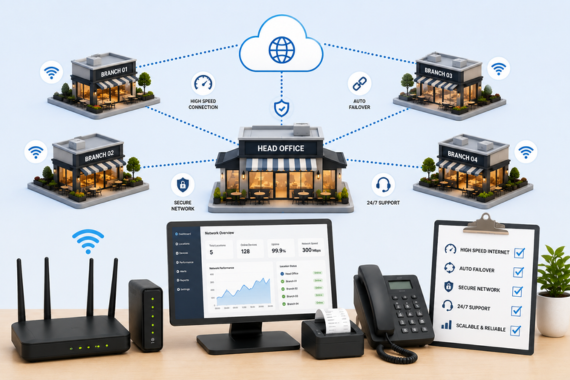
Running connectivity across many restaurant locations works best when every unit uses the same standardized network design, failover, and security, all managed centrally. That consistency is what keeps a 5, 20, or 100 unit group online without a dedicated IT team at each store.
Why multi-unit connectivity is a different problem
Connecting one restaurant is a project. Connecting twenty is a system. Every location you add is another point of failure, often with a different local internet provider, different equipment, and no IT person on site. When something breaks at store number 14, the manager is a chef, not a network engineer. Multiply that across a growing footprint and inconsistent connectivity quietly becomes one of the biggest operational risks a restaurant group carries.
The groups that scale smoothly treat connectivity as standardized infrastructure, not a series of one-off installs. That is the core idea behind a managed network built for multi-unit operators.
The standardization principle
The fix for multi-location chaos is sameness. Every location runs the same firewalls, the same network switches, the same security policies, the same VoIP, and the same backup internet or SD-WAN. When every unit is built to one blueprint, a problem at any location looks familiar, support is faster, and a new store opens with the exact protection of your best-performing one. Vivant describes this as a fully redundant and unified design across all locations, and it is what lets a small corporate team manage a large footprint.
Where SD-WAN comes in
SD-WAN is the technology that makes a multi-location network behave like one system. It intelligently routes and prioritizes traffic at every site, so payments and orders always take priority, and it can blend primary and backup connections for seamless failover. With dynamic traffic management across the whole group, each location stays fast and reliable without someone tuning it by hand.
Central visibility and monitoring
You cannot manage what you cannot see. A multi-unit network needs central monitoring so issues are caught and often resolved before a store even notices. Proactive management means the provider sees an outage at one location, the failover engages, and the problem is handled in the background while the restaurant keeps serving. This is the difference between reactive firefighting and a network that simply runs.
The operators who live it describe it well. Tim Slaughter, whose group runs nine locations, said the best vendor partners are the ones you never have to call because things always work. That is the standard multi-location connectivity should aim for.
The hidden cost of inconsistency
When every location is a little different, the cost shows up everywhere at once. Support takes longer because no two sites troubleshoot the same way. Equipment failures are harder to diagnose because the gear varies. Security gaps open up because policies drift from store to store. And the corporate team spends its time chasing local problems instead of growing the business. Inconsistency is rarely a single big failure. It is a steady tax on time and reliability that grows with every location you add.
Standardization reverses that. A known design means a known fix, a known cost, and a known level of protection at every site. The larger the group, the more that consistency is worth, which is why the operators running dozens of locations are usually the most disciplined about it.
Onboarding new units, acquisitions, and franchises
Growth rarely comes in neat packages. A group might build a new location, acquire a few units running on whatever the previous owner installed, and sign franchisees with their own ideas about IT. A standardized, centrally managed network is what brings all of that onto one blueprint. New builds get provisioned to the standard, acquired sites get refreshed to match, and franchisees get a turnkey setup that protects the brand experience. The result is that a guest gets the same reliable experience whether they walk into your oldest store or your newest, and the brand is not exposed by the weakest link in the network.
Reporting and accountability across the group
Once connectivity is standardized and centrally managed, something useful becomes possible: you can finally see it. A good managed setup gives the corporate team visibility into uptime, outages, and performance across every location, so problems are measured instead of guessed at. That turns connectivity from a black box into something you can hold a partner accountable for. When a provider guarantees uptime and reports against it, the conversation shifts from chasing whoever is at fault to reviewing the numbers, and the locations that need attention surface on their own instead of after a manager calls upset.
The total cost of ownership picture
Multi-location operators often compare providers on the monthly line item and miss the real number. The true cost of connectivity includes the staff hours spent troubleshooting, the revenue lost to outages, the time the corporate team spends coordinating multiple vendors, and the risk carried by inconsistent security across sites. A slightly cheaper local plan that goes down twice a quarter and has no failover is far more expensive than it looks once those costs are counted. A standardized, managed approach usually wins on total cost of ownership precisely because it removes the hidden expenses, fewer outages, less staff time, one vendor to manage, and consistent protection, even when the headline price looks similar. For a group, that math compounds with every location.
PCI compliance across every location
Compliance gets harder as you add locations, because every site that takes cards is part of your PCI footprint. Standardizing PCI-compliant security across all units, with managed firewalls and consistent policies, keeps compliance manageable instead of a per-store scramble. One franchisee running Dave’s Hot Chicken and Blaze Pizza noted that having the provider take on PCI compliance was a huge relief for a company without a dedicated IT team.
One partner, one bill, across the footprint
The operational payoff of standardization is simplicity. Instead of juggling a different ISP, phone vendor, and security contract at every location, a multi-unit group runs internet, backup, phones, and security through one managed provider with one bill and one support team. That is how groups like Spring Creek Barbeque, with 29 locations, and operators running a dozen or more Jimmy John’s keep connectivity off their worry list. To map this across your locations, get a free cost analysis or start with the complete restaurant connectivity guide.
Frequently Asked Questions
How do you manage internet across multiple restaurant locations?
By standardizing the network design at every site, the same firewalls, switches, failover, and security, and managing it centrally with proactive monitoring, usually through a single managed provider rather than separate local vendors.
What is SD-WAN for restaurants?
SD-WAN is technology that intelligently routes and prioritizes internet traffic across locations. It keeps payments and orders prioritized, blends primary and backup connections for seamless failover, and makes a multi-site network behave like one consistent system.
Do I need IT staff at each location?
No. The point of a standardized, centrally managed network is that individual locations do not need on-site IT. The provider monitors and manages every site remotely and handles failover and issues in the background.
How do multi-unit restaurants keep every location online?
Each location gets its own automatic backup and failover internet as part of a standardized design, so an outage at one site is handled locally while the rest of the group is unaffected.
Is it cheaper to use one provider across all locations?
Usually, yes, once you account for total cost of ownership. Consolidating internet, backup, phones, and security under one managed provider reduces vendor overhead, simplifies billing and support, and standardizes equipment across the group.
Map standardized connectivity across your locations.
Get a free cost analysis of internet, backup, phones, and security across the group.