Quick-service restaurants operate at a pace and volume that puts more stress on network infrastructure than almost any other commercial environment. A high-volume QSR location — a McDonald’s, Chick-fil-A, Raising Cane’s, or comparable fast-food unit — can process 500 to 1,000 transactions per day across drive-through, counter, kiosk, and mobile ordering channels. Every one of those transactions touches the network. Many of them happen simultaneously.
The connectivity requirements for a high-volume QSR are fundamentally different from those of a full-service restaurant. The transaction rate is higher. The latency tolerance is lower. The number of connected endpoints is larger. And the cost of downtime, measured in cars that drove away or orders that failed, is immediate and visible in real time.
The QSR Network Landscape in 2026
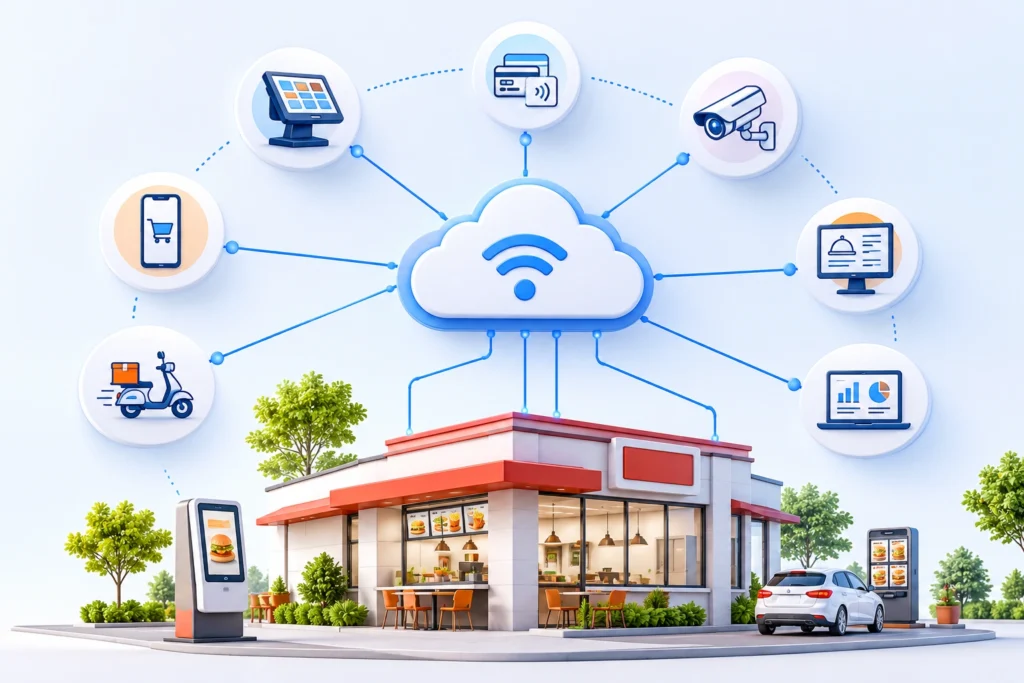
A modern high-volume QSR location typically runs the following connected systems simultaneously:
- Multiple POS terminals (front counter, drive-through order-taking stations)
- Drive-through intercom and AI ordering system
- Kitchen display systems — typically four to eight screens in high-volume configurations
- Self-service ordering kiosks — two to six units per location
- Outdoor digital menu boards — dual-display drive-through configurations
- Mobile order integration — direct from the brand app to the make line
- Third-party delivery aggregators
- Loyalty and CRM platform
- Inventory and waste tracking
- Connected kitchen equipment with IoT sensors
- Security cameras — typically 12 to 24 cameras per location in current builds
- Staff communication systems (headsets, back-of-house intercoms)
- Guest WiFi
Each system has its own bandwidth requirement, latency sensitivity, and failure mode. The network has to support all of them simultaneously, maintain QoS prioritization between competing traffic types, and do it reliably across a service window that may run 18 to 24 hours a day.
Drive-Through Connectivity: The Highest-Stakes Lane
The drive-through lane is where QSR connectivity is most visible — and most consequential. Drive-through represents 60 to 75 percent of sales at most QSR locations. Speed of service in the drive-through is a key competitive metric, measured in seconds per car. Any connectivity issue that adds two or three seconds of latency to order confirmation, payment processing, or KDS ticket routing translates directly into measurable throughput loss.
AI-powered drive-through ordering systems — deployed by major chains including McDonald’s, Taco Bell, and dozens of regional operators — add a new connectivity dependency. The voice AI system requires a low-latency connection to its cloud inference engine to process natural language orders in real time. Latency above 150ms causes perceptible delays in the AI’s responses, degrading the guest experience and slowing throughput.
Drive-through POS and payment processing are maximally latency-sensitive. A tap-to-pay transaction that takes four seconds feels seamless to a guest. A transaction that takes twelve seconds because of network latency causes hesitation, and hesitation causes backup.
Kiosk Connectivity Requirements
Self-service kiosks are the fastest-growing connected endpoint category in QSR. A kiosk does everything a front-counter POS does — takes orders, processes payments, updates inventory, routes tickets to the KDS — but it does it without a staff member managing the transaction. The tradeoff is that there is no human to recognize and work around a connectivity problem.
A kiosk that loses its connection mid-transaction leaves the guest staring at an error screen with no one to help. The order is lost, the payment may or may not have processed, and the guest experience is damaged. High-volume kiosk environments require the same failover infrastructure as POS — wired connections where possible, with monitored wireless as a fallback.
Bandwidth Planning for High-Volume QSR
A high-volume QSR with a full connected stack should plan for 100 to 200 Mbps of dedicated operational bandwidth, separate from guest WiFi. The breakdown:
- POS terminals (6–8 units): 15–25 Mbps combined
- KDS displays (6–8 screens): 5–10 Mbps combined
- AI drive-through ordering: 10–25 Mbps sustained
- Digital menu boards (outdoor): 10–20 Mbps during update cycles
- Security cameras (16–24 streams): 40–80 Mbps
- Mobile ordering integration: 5–10 Mbps
- IoT sensors and connected equipment: 5–10 Mbps
- Guest WiFi: 20–50 Mbps depending on volume
These figures assume normal operating load. During firmware updates, menu board content syncs, or security camera footage uploads, burst demand can spike significantly above sustained baselines.
Latency Standards for QSR Operations
Bandwidth gets the attention, but latency is the variable that determines whether a QSR network feels fast or broken. The latency standards for each major QSR system:
- Payment processing: under 50ms to payment gateway
- POS to KDS routing: under 500ms end-to-end
- AI drive-through ordering: under 100ms to cloud inference endpoint
- Kiosk order confirmation: under 1 second end-to-end
- Mobile order push to KDS: under 2 seconds
Network Architecture for High-Volume QSR
A network architecture built for high-volume QSR operations requires several elements that exceed the standard restaurant setup:
Multi-VLAN segmentation — separate VLANs for payments (PCI scope), operations (POS, KDS, kiosks), drive-through (AI ordering, intercom, outdoor equipment), management (cameras, IoT, back-office), and guest. Each segment has dedicated QoS policies and access controls.
Dual-WAN with active-active SD-WAN — high-volume QSR cannot tolerate even 60-second failover windows during peak drive-through service. Active-active SD-WAN bonds multiple circuits and routes around failures in real time.
Enterprise-grade wireless infrastructure — WiFi 6 or WiFi 6E access points designed for high-density environments. Consumer or hospitality-grade access points will not sustain the concurrent connection count a fully loaded QSR requires.
24/7 network monitoring with proactive alerting — QSR locations do not have on-site IT staff. A managed connectivity provider with around-the-clock monitoring and remote remediation capability is the operational standard for franchise and chain operators.
Frequently Asked Questions
How much bandwidth does a high-volume QSR need?
A fully connected high-volume QSR should plan for 100 to 200 Mbps of dedicated operational bandwidth, separate from guest WiFi. Security cameras and AI drive-through systems are the largest bandwidth consumers.
What latency is acceptable for QSR payment processing?
Payment transactions should complete to the payment gateway in under 50ms. Latency above 100ms creates perceptible delays at the payment terminal that slow throughput in drive-through and counter environments.
How does internet downtime affect QSR drive-through performance?
Drive-through represents 60 to 75 percent of QSR sales. Any connectivity disruption that slows POS response, payment processing, or KDS ticket routing adds seconds per car — which translates directly into throughput loss and increased wait times.
Do QSR kiosks need wired internet connections?
Wired connections are strongly preferred for kiosks. A kiosk that loses WiFi connectivity mid-transaction has no staff member to intervene, leaving the guest with a failed payment and no recourse. Wired Ethernet with monitored wireless fallback is the recommended configuration.
Build a network that keeps every QSR lane moving.
Get a free cost analysis of bandwidth, failover, and monitoring for high-volume locations.