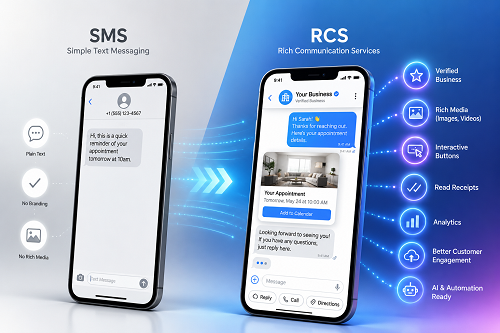
RCS (Rich Communication Services) is the advanced version of SMS. It comes with features you’d normally get with a chat app – read receipts, high-resolution images, and interactive buttons.
If you’ve been sending customers appointment reminders or order confirmations by text for years, you may have recently heard the term “RCS” pop up and wondered if it changes anything for you.
Well, yes, it does.
This article breaks down how the two differ, which kinds of businesses stand to gain the most from RCS, and what it actually means for how you communicate with customers today.
What is SMS?
SMS stands for Short Message Service. It’s the plain-text messaging standard that’s been around since the early 1990s, and it works on every phone, regardless of carrier or internet connection. At its core, this messaging protocol allows you to send text messages from one phone number to another.
Key Features:
- Universal compatibility with all mobile devices, including smartphones and basic feature phones.
- It allows bulk messaging through your business phone service. This way, you can send the same message to hundreds of customers simultaneously.
- Messages are capped at 160 characters. Messages that exceed this limit would be split into segments.
- Images are sent via MMS (the multimedia extension of SMS). They’re heavily compressed and often look poor on the recipient’s end.
- Requires no internet to send messages and relies mainly on cellular signals. This means messages can be sent to areas with weak network coverage.
- It offers interactive two-way messaging. Recipients can reply to messages, confirm orders, and engage with offers.
Despite its flexibility, SMS also has limitations. There are no read receipts, so you have no way to know if a customer actually saw your message. Also, unlike RCS, it doesn’t have interactive buttons. This means if you want a customer to confirm an appointment, they have to reply with a word or tap a link to respond elsewhere.
What is RCS?
RCS stands for Rich Communication Services. Think of it as what SMS would have become if it had been updated for the smartphone era. This messaging protocol allows users to send richer, interactive messages to recipients directly through the phone’s default messaging app. It works natively on supported Android and iOS devices.
Key Features:
- High-resolution images and video. You can share large files, including product photos, menus, and promotional visuals, without worrying about them being compressed before they’re delivered to the recipient.
- Interactive buttons. Recipients can confirm a reservation, book an appointment, or call your business directly from inside the message. This allows your customers to take action instantly, right within the chat.
- Read receipts feature built in. You can see when a message was delivered and when it was opened.
- Typing indicators built in so the recipient can see when you’re composing a reply, and vice versa.
- End-to-end encryption (E2EE) to keep your chats private and secure.
- Branded sender profiles. Instead of an unfamiliar phone number, your business name, logo, and a verified badge appear in the message thread. This helps your customers quickly recognize who the message is coming from.
- You have access to more media types, including videos, GIFs, carousels, and even product cards.
- You can create group chat conversations, where you manage the participants.
However, RCS requires both the sender and the recipient to have RCS-capable devices and carrier support. If your receiver (or customer) doesn’t use one, the messages automatically fall back to standard SMS.
RCS vs SMS: Side-by-Side Comparison
Here’s a quick look at how SMS and RCS differ:
| Feature | SMS | RCS |
| Message length | 160 characters | No practical limit |
| Images and video | Compressed, low quality (MMS) | High resolution |
| Read receipts | No | Yes |
| Interactive buttons | No | Yes |
| Branded sender profile | Shows phone number | Shows business name and logo |
| Requires internet | No | Yes |
| Device compatibility | All phones | Android and iOS (2024+), not all carriers |
| Fallback | N/A | Automatically falls back to SMS if unsupported |
What Does This Mean for Your Business?
Imagine you run a restaurant and you send customers a reservation confirmation by text. With SMS, your message would be like this:
“Hi Paul! Your table for 4 at Bella Bistro is confirmed for Friday, June 26, at 7:00 PM. Reply YES to confirm or call us to make any changes.”
With RCS, the same message can display your restaurant’s name and logo, include a map link, and give the customer a “Confirm” button and a “Cancel” button, all in one notification.
This convenience makes it easy for customers to send a reply immediately when they see your message.
Other benefits are:
It helps you build trust:
When your business name and a verified badge appear in the message thread instead of a random number, customers are more confident that the message is legit and are more likely to respond. This is most important in sensitive scenarios, such as payment notifications, where customers need assurance that the message is directly from your business and not from a scammer.
It works with all smartphones:
Just like SMS, RCS is built into smartphone messaging apps, so your customers don’t need to download anything. If you’re in the hospitality industry and trying to reach a wide customer base, this flexibility makes it easier to engage customers at scale.
It improves customer experience
Customers love convenience. According to research from Salesforce, 89% of customers are more likely to buy repeatedly from a brand that offers excellent customer service. And at the heart of your customer service is clear, timely communication.
RCS makes it easy for you to offer this to your customers. With the interactive feature, customers can view details concerning their orders and take action without being redirected to another app or website.
Access to real-time customer data
With SMS, you don’t really know who opened your message and when. RCS solves this with the read receipt feature. Once you send messages to your customers, you can see which were opened and which weren’t. Over time, this gives you an idea of your open rate and the best time of the day for higher conversions.
Should Your Business Switch to RCS?
Yes, switch to RCS if you:
- Already send SMS appointment reminders and want to improve the experience without changing your whole setup.
- Run a restaurant or other service business where confirmation speed matters and need customers to respond immediately.
- Want to make it easier for customers to confirm or reschedule from inside a message.
- Need visibility into your delivery and open rates.
However, keep in mind that not every carrier or device supports RCS yet. Although most devices and carriers support it, it’s not yet universal like SMS. This means that if a customer’s device or carrier doesn’t support RCS, they still receive the message as a standard text message.
Before making any changes, check whether your current phone or messaging platform supports RCS sending. If it doesn’t, reach out to your provider.
Rounding Up
RCS isn’t a replacement for SMS. You can get the best of both worlds by combining the two options, especially if you cater to a broad demographic.
Vivant’s business phone and internet platform keep your team connected, whether that’s managing calls, messages, or the network that powers it all. One provider, one bill, zero downtime. Get in touch with us today to see how Vivant supports your business communications.
FREQUENTLY ASKED QUESTIONS
What is the difference between RCS and SMS?
SMS is the standard text message format that has existed for decades. It’s plain text, up to 160 characters, and works on any phone without an internet connection.
RCS, on the other hand, is a newer standard built into the native messaging apps on modern phones that adds read receipts, high-resolution media, interactive buttons, and branded business profiles.
Does RCS work on iPhones?
Yes, RCS works on iPhones. Apple added RCS support to iOS, which allows iPhone users to receive RCS messages through the native Messages app. However, it only works on iPhones running iOS 18 or later.
Is RCS better than SMS for businesses?
Yes, RCS is better for businesses that require customer-facing text communication, such as appointment reminders, order confirmations, and promotional messages. This is because the messages look more professional, and customers can take action without leaving the message thread. Also, businesses can display a verified name and logo instead of a phone number.
What happens if someone doesn’t support RCS?
The message automatically falls back to standard SMS. The recipient gets the message as a regular text without the interactive buttons, high-res images, or branded profile that an RCS-capable device would display.
Do I need a special app for RCS?
No. RCS works inside the messaging app already installed on the phone, that is, the default Messages app on Android and the Messages app on iOS.
Build infrastructure that keeps the whole stack running.
Get a free cost analysis of bandwidth, segmentation, and failover across your locations.